None
EN
Chrome rolling out Gemini 3-powered ‘auto browse’ with Google AI Pro
['Abner Li', 'Andrew Romero', 'Will Sattelberg']
9to5Google
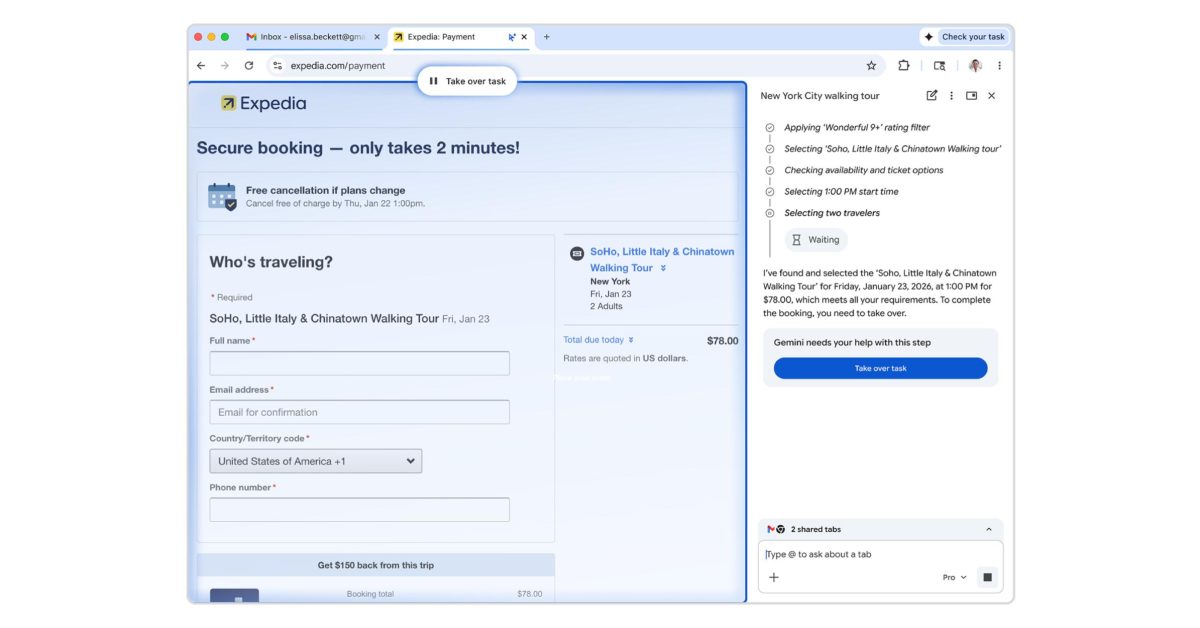
Google today announced “Chrome auto browse” as a “powerful agentic experience that handles multi-step chores on your behalf.”Available on desktop, auto browse is triggered by specifying a task when prompting Gemini in Chrome.
Chrome will also note whenever auto browse is active in the top-right corner of your window next to the Gemini spark.
Auto browse can use Google Password Manager to auto-fill credentials, but you have to first authorize it.
At any time in the process, you can “Take over task.”Advertisement - scroll for more contentYou can continue to visit other sites as auto browse works in the background.
Prompt: “Using the information in our team roster register our team for this form and fill in their names and positions.”After previewing last year, Chrome auto browse is rolling out starting today to AI Pro and AI Ultra subscribers in the US.